As i need to check the console of a booting banana pi and i dont have a ttls to usb converter availabl, but have another bpi, i just connect both directly.
Using info available at Lemaker site, that i quote bellow, and its image as guide.
“The default serial port /dev/ttyS0 at MMIO 0x1c28000, used for (bootstrap) debugging and the serial console, is located at J11 – refer to the picture and instructions below.”
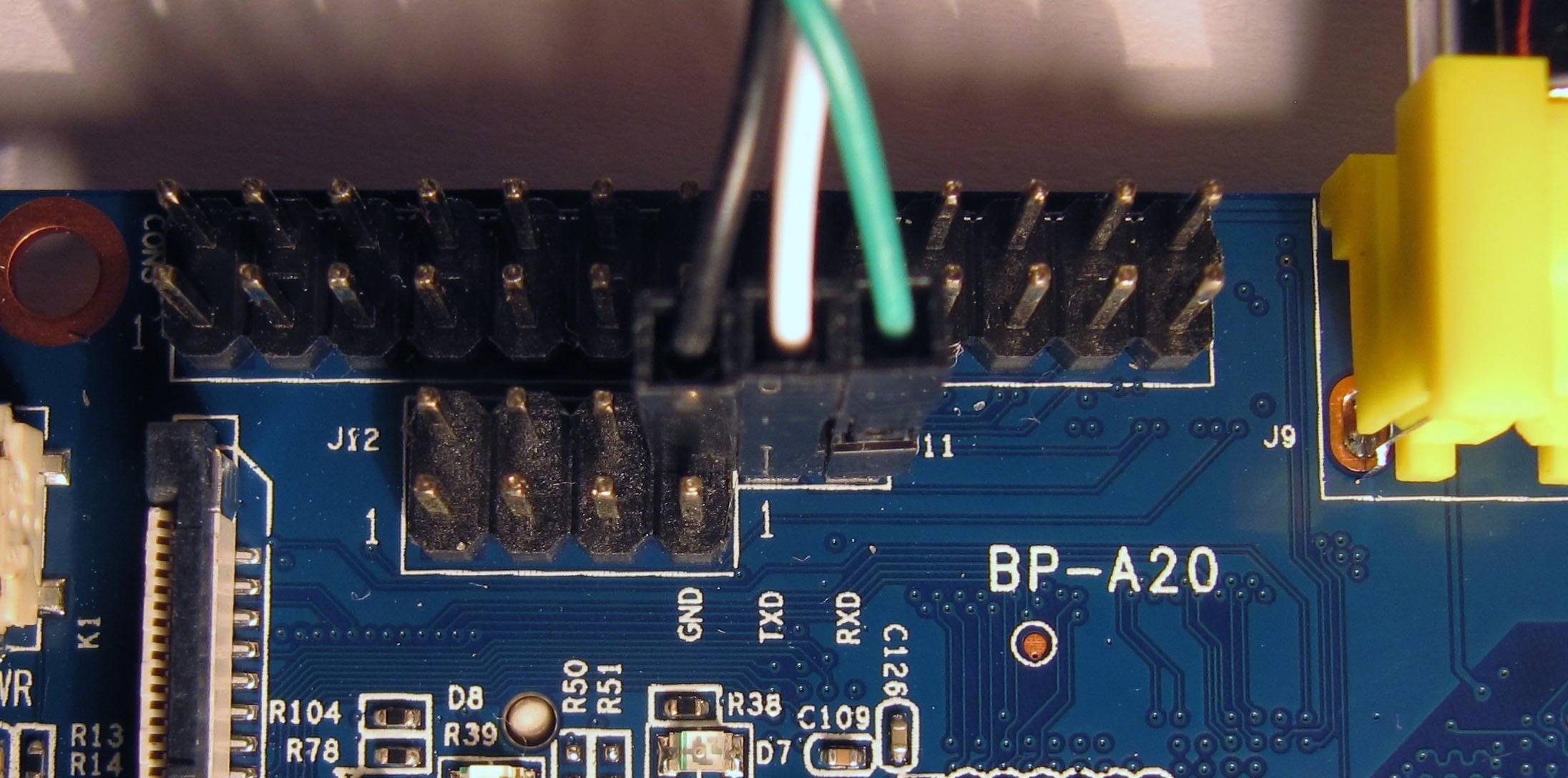
Just put:
- The black wire on both bpi in gnd,
- The white wire on one pi in txd, on the other in rxd,
- The green wire on one pi in rxd, on the other in txd,
cat /dev/ttyS0
Sample try booting minix on banana pi
U-Boot SPL 2014.04-10733-gbb5691c (Jul 08 2017 - 11:56:59)

Board: BananaPi

DRAM: 1024 MiB

CPU: 960000000Hz, AXI/AHB/APB: 3/2/2

spl: not an uImage at 1600


U-Boot 2014.04-10733-gbb5691c (Jul 08 2017 - 11:56:59) Allwinner Technology


CPU: Allwinner A20 (SUN7I)

Board: BananaPi

I2C: ready

DRAM: 1 GiB

MMC: SUNXI SD/MMC: 0

*** Warning - bad CRC, using default environment


In: serial

Out: serial

Err: serial

Net: dwmac.1c50000

Hit any key to stop autoboot: 0

reading uEnv.txt

810 bytes read in 22 ms (35.2 KiB/s)

Loaded environment from uEnv.txt

Running uenvcmd ...

starting from MMC

mmc - MMC sub system


Usage:

mmc read addr blk# cnt

mmc write addr blk# cnt

mmc erase blk# cnt

mmc rescan

mmc part - lists available partition on current mmc device

mmc dev [dev] [part] - show or set current mmc device [partition]

mmc list - lists available devices

mmc setdsr - set DSR register value


reading script.bin

50972 bytes read in 30 ms (1.6 MiB/s)

reading kernel.bin

264580 bytes read in 41 ms (6.2 MiB/s)

reading ds.elf

79852 bytes read in 31 ms (2.5 MiB/s)

reading rs.elf

113152 bytes read in 28 ms (3.9 MiB/s)

reading pm.elf

81024 bytes read in 31 ms (2.5 MiB/s)

reading sched.elf

44520 bytes read in 29 ms (1.5 MiB/s)

reading vfs.elf

182184 bytes read in 41 ms (4.2 MiB/s)

reading memory.elf

2762932 bytes read in 185 ms (14.2 MiB/s)

reading tty.elf

63428 bytes read in 35 ms (1.7 MiB/s)

reading mib.elf

82600 bytes read in 31 ms (2.5 MiB/s)

reading vm.elf

165788 bytes read in 40 ms (4 MiB/s)

reading pfs.elf

56336 bytes read in 29 ms (1.9 MiB/s)

reading mfs.elf

106368 bytes read in 32 ms (3.2 MiB/s)

reading init.elf

318100 bytes read in 44 ms (6.9 MiB/s)

console=tty02 rootdevname=c0d0p1 verbose=0 hz=1000 board_name=

## Starting application at 0x80200000 ...

software interrupt

pc : [<80200a40>] lr : [<80200a40>]

sp : 80204fb8 ip : 00000041 fp : 00000000

r10: 00000003 r9 : 7fb66f0c r8 : 7ffbc724

r7 : 7fb7c480 r6 : 80200000 r5 : 00000003 r4 : 80205144

r3 : 8020a794 r2 : 00000000 r1 : 80205131 r0 : ffffffbf

Flags: nZCv IRQs off FIQs off Mode SVC_32

Resetting CPU ...


resetting ...